 Skip to main content


In this newsletter, you’ll find the latest updates to the Sharefox rental management platform — including seasonal pricing, easier payment card changes, improved accessory display, new booking defaults, and more. Here’s everything that shipped this month, why it matters, and how to turn it on for your shop.
Seasonal prices
Demand for rentals rarely sits still through the year — a construction rental business might see summer peaks, while a ski or winter-sports operator sees the opposite pattern. If you want to adjust the price of your products for specific months, this is now possible in Sharefox.

Maybe you want to lift prices during the summer high season, or reduce them through the quieter winter months to keep utilization up. Seasonal pricing lets you plan that in advance instead of manually editing prices every quarter. Let us know and we’ll enable it for your site — it slots directly into the flexible pricing engine already running your shop.
“Seasonal demand is one of the biggest profitability levers in rental — and until now, most operators were adjusting it by hand every quarter. Automating it removes a recurring chore and makes it far less likely that a price change gets forgotten,” says the Sharefox product team.
Change payment card
For merchants running subscription rentals or any recurring card payment, keeping customer card details current is essential — an expired card is one of the most common causes of failed recurring charges and unnecessary churn.

When enabled for your site, customers can log in to My Rentals in the shop and choose “Change Card” under Active Payment Methods, then enter the new card details. These details are then used for future subscription fees, or when you need to charge the customer’s card for extra costs such as damage or late fees.
This builds on the payment methods already available in Sharefox, giving customers a self-service way to stay current without a support ticket.
Included accessories can now be shown or hidden
If a product comes with an included accessory — like a battery bundled with a drill, or a helmet included with a scooter — you can now choose to make that accessory visible to customers in the shop.

Go to the product page of the main item in your inventory management system and enable “Visible” next to the included accessory. It’s a small change, but it removes a common source of pre-booking questions: customers can now see exactly what’s included before they check out.
Schedule: “Today” is now the default view
Previously, opening the schedule — especially toward the end of a week or month — showed a long list of historic bookings before you reached anything current. We’ve changed the default so “today” is now the first day shown, giving you an immediate view of upcoming orders rather than scrolling past days that have already passed.
It’s a small interface change, but for teams checking the booking calendar multiple times a day, it adds up to meaningfully less friction.
Restrict booking of product categories unless the customer is whitelisted
Some product categories shouldn’t be bookable by just anyone. If you rent out heavy or specialized equipment — say, machinery in the construction and heavy equipment vertical — where a customer needs proven training or certification before they can book, you can now restrict entire categories to whitelisted customers only.
Once configured, only customers you’ve explicitly approved will be able to book products from those restricted categories. Reach out to our support team and we’ll help you get it configured for your shop.
Pre-filled public order notes
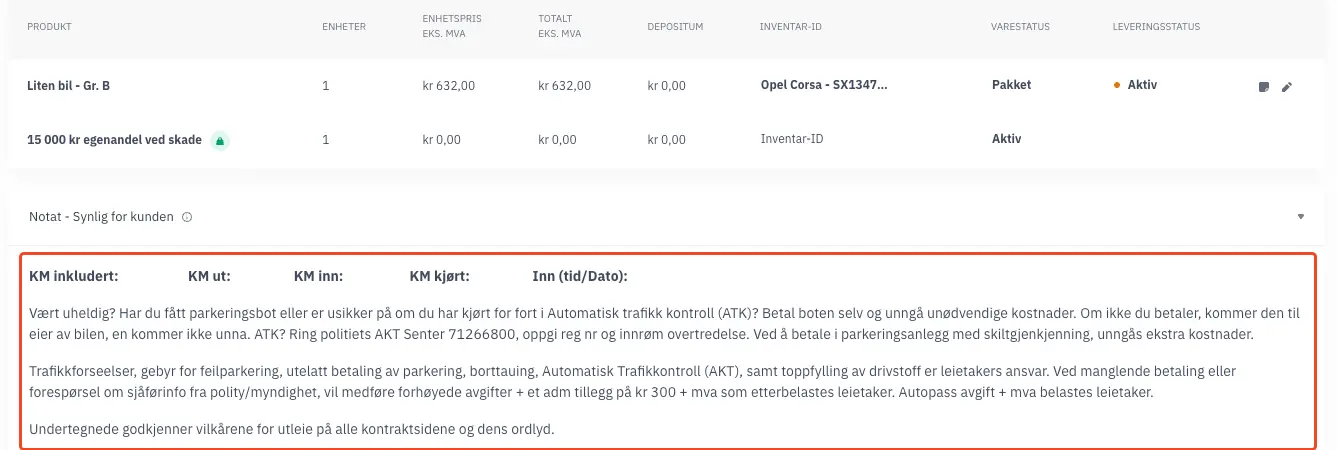
Public order notes can now be pre-filled with text tailored to your business — ideal if you have standard terms, pickup instructions, or disclaimers you want attached to every contract automatically. Let us know if you’d like this configured for your site.
Small updates
- Webshop Contact Us section topics are fully editable from Admin under Settings > Template > Contact Us
- Autopass fees of 0 kr are now excluded from the AutoSync/Fremtind import
- The General Accounting Report has a new column for Inventory ID
- Email templates now show product question answers and access codes
- Reminder: e-signatures are available — see how it works in this video
- The schedule now clearly indicates which inventory units have been disabled
- For Fortnox, the invoice due date is now optional
- The barcode feature now supports special characters such as
*#%@
What changed this month, at a glance
| Update | Who it’s for | Manual setup needed? |
|---|---|---|
| Seasonal prices | Businesses with seasonal demand swings | Yes — contact support |
| Change payment card | Subscription & recurring-card merchants | No — self-service for customers once enabled |
| Included accessories visible | Product bundles (e.g. tool + battery) | No — toggle per product |
| “Today” default in schedule | All operators using the schedule | No — automatic |
| Whitelisted category booking | Restricted/heavy equipment rentals | Yes — contact support |
| Pre-filled order notes | Businesses with standard contract terms | Yes — contact support |
Why this matters for your rental business
Recurring payment failures and unclear inventory visibility are two of the more common, quietly expensive problems in rental and subscription commerce. Card-on-file expirations are a well-documented driver of involuntary churn in subscription businesses, which is why card-updater and self-service card-change flows have become standard practice across payment providers (see Stripe’s documentation on this, linked below). Similarly, access restrictions on specialized equipment reflect a broader industry reality: many jurisdictions require operator training or certification before certain machinery can be used, which is part of why category-level booking restrictions are useful beyond convenience — they support compliance.
 All in one platform


