 Skip to main content



If you rent skis, bikes, kayaks, or any other gear that comes in more than one size or spec, you already know the problem: one “product” in your system quietly turns into ten products the moment you try to list every length, width, or model. Sharefox’s variant module solves this by letting you manage one product with multiple options underneath it — and, unlike a generic e-commerce variant field, it’s built to work with rental-specific things like per-variant availability and product bundles. This guide walks through what the module actually does, how to set it up, where it earns its keep in a sports rental business, and where shops trip themselves up.
What the variant module actually does
The variant module lets you take one product listing — “Alpine ski,” “Mountain bike,” “Touring kayak” — and attach multiple selectable options to it, each tracked as its own item in your inventory. A customer sees one product page; behind it, Sharefox tracks the length-160cm skis separately from the length-170cm skis, with their own stock count and their own live availability calendar.
This matters because a rental listing isn’t a retail SKU — it’s a bookable slot. Retail e-commerce variant tools only need to track “in stock” or “out of stock.” A rental variant needs to know that the 170cm skis in size are booked from Tuesday to Friday but the 160cm pair is free, and it needs to stop a customer from booking a size that’s already out the door. That’s the difference between a generic variant field and one built for rental.
Setting one up is a short workflow inside the product editor:
- Open the product you want variants for.
- Go to the Variants tab and select Add Variant.
- Name the option (e.g. “Length: 170cm” or “Frame size: M”).
- Set the stock count and, if the variant should cost more or less than the base product, a variant-specific price.
- Repeat for each option, then save.
Full click-by-click screenshots live in the Sharefox Academy guide on managing products if you want to follow along inside your own account while reading this.
How variants work inside product bundles
Product bundles let you sell several rental items as one package at one price, and variants can sit inside that bundle. So instead of a customer booking skis, then separately booking boots, then separately booking poles, you can build a single “Ski Package” bundle that contains a ski variant (by length), a boot variant (by size), and a pole — booked and paid for as one line item.
This is also where a lot of the operational value shows up. Bundling variant-based products means:
- The customer books once, with one set of size selectors, instead of juggling three separate product pages.
- Your team fulfils one order instead of three, with the pick list generated automatically from the variant selections.
- You can price the bundle below the sum of its parts, which is the actual mechanism behind “package discounts” — read more on why product bundles work in rental if you haven’t set one up yet.
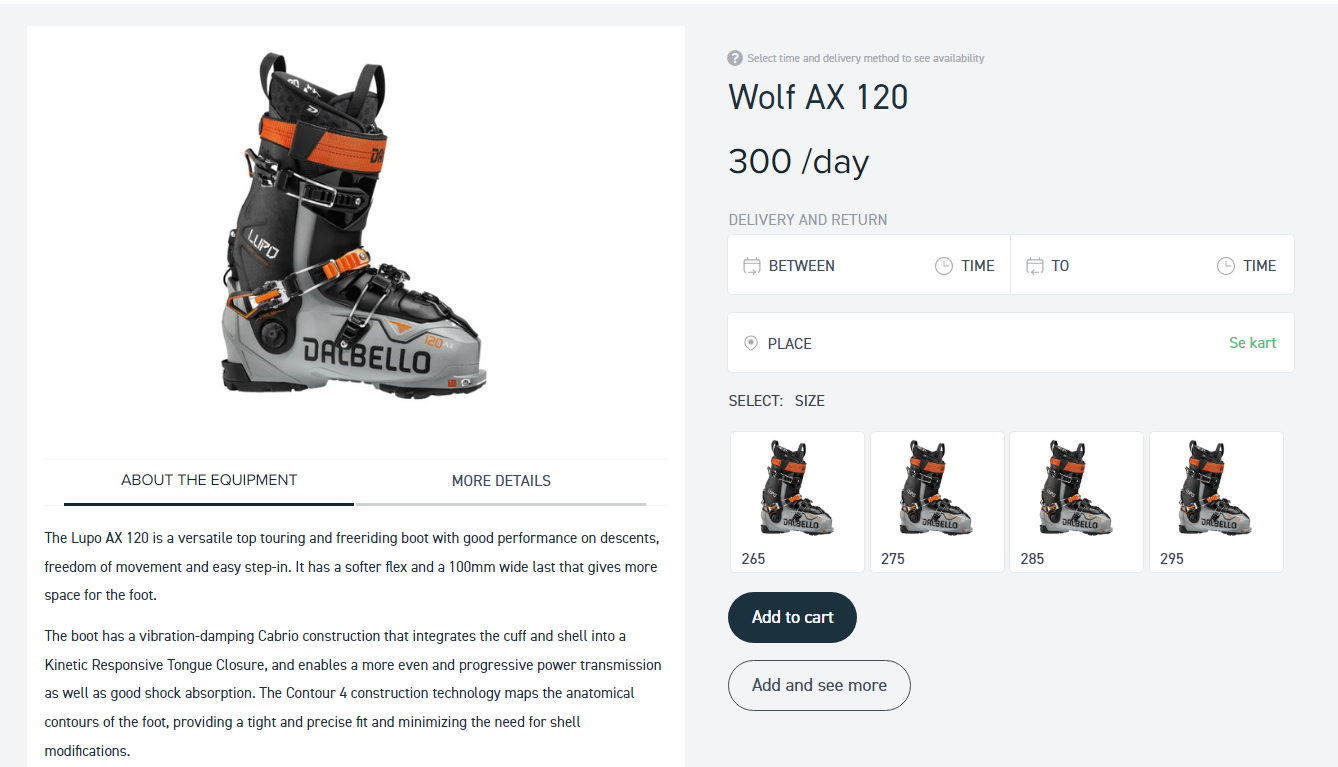
Setting up your first variant: a ski rental example
Here’s the concrete version of the workflow above, using a ski shop as the example — the same steps apply if you swap in bike frame sizes, kayak lengths, or tent capacities.
- Create the base product — “Alpine Ski Rental” — with your standard description, photos, and rental terms.
- Add a variant for length, e.g. 150cm, 160cm, 170cm, 180cm, each as its own option under the Variants tab.
- Set stock per length, matching what’s actually on your rack. If you have six pairs at 170cm, that’s the number you enter — not your total ski count.
- Add a second variant dimension if you need one, such as width or skill level (beginner/intermediate/advanced), so a customer filters by both length and ability.
- Attach the ski variant to a bundle alongside a boot-size variant and poles, if you’re selling a package rather than skis alone.
- Preview the booking flow as a customer would see it, and confirm the size selectors show correctly and that an out-of-stock length is greyed out rather than silently bookable.
If you’re setting this up for the first time, budget an afternoon per product category — most of the time goes into counting and entering real stock numbers per size, not into clicking through the tool itself.
What we see working across sports rental shops
The shops that get the most out of the variant module are the ones that resist the urge to over-split their sizing. A recurring pattern we’ve seen in outdoor and sports rental accounts: shops that set up ten narrow width variants per ski length end up with dozens of near-empty inventory buckets that are hard to keep accurate, while shops that group into three or four practical bands (e.g. narrow/regular/wide) keep stock counts accurate and bookings moving.
MOHSport, an outdoor rental operator in Hemsedal, is a useful reference point here — their business runs on renting e-bikes and mountain bikes across a season with heavy weekend demand, which is exactly the kind of pattern where accurate per-size availability (rather than one pooled “bikes” count) prevents a Saturday-morning double-booking. You can read their setup in the MOHSport case study. Bike-focused shops like Boss Cykler and Marbella Rent a Bike follow a similar logic with frame-size variants.
Variant structures by sport — a quick reference
Different sports gear needs different variant dimensions. This is the starting structure we see work most often — treat it as a first draft to adjust against your own stock, not a fixed rule.
| Sport / gear | Primary variant | Secondary variant | Typical bundle partner |
|---|---|---|---|
| Alpine skis | Length (cm) | Width / skill level | Boots, poles, helmet |
| Snowboards | Length (cm) | Flex / skill level | Boots, bindings |
| Mountain bikes | Frame size (S/M/L/XL) | Wheel size | Helmet, lock |
| Kayaks | Length / hull type | Seat configuration | Paddle, life vest |
| Tents | Capacity (2/4/6-person) | Season rating | Sleeping mats |
For kayak-specific setup notes, see the kayak rental software guide; for the wider bike-shop context, see why the local bike store needs a booking system.
Earning more revenue from variant offers
Once the size structure is accurate, the variant module becomes a pricing and merchandising tool, not just an inventory fix. A few approaches that work well in sports rental specifically:
- Price premium variants higher. A newer ski model or a lighter carbon frame can carry its own variant price above the base rate — customers self-select into the upgrade without you needing a separate product listing.
- Bundle your most-booked variants. If your 170cm ski and medium boot size are your most common combination, package them as a named bundle with a small discount — it converts better than making customers assemble the same combination manually.
- Adjust pricing by season on the same variant. A 170cm ski variant can carry different rates in peak week versus shoulder season without creating a duplicate product.
- Surface the upgrade at the point of selection. When a customer picks a base variant, show the next tier up next to it — this is straightforward upselling, and it works because the comparison is visible in the same screen rather than requiring a second search.
Common pitfalls
- Splitting sizes too finely. Ten narrow variant bands per product looks precise but makes stock counts hard to keep accurate — most shops do better with three to five practical bands per dimension.
- Forgetting to update stock counts after damage or retirement. A variant that still shows “3 in stock” after two pairs were pulled for repair is how double-bookings happen — treat variant stock counts like you’d treat a live inventory feed, because that’s what it is.
- Building bundles before variants are accurate. A bundle inherits whatever inaccuracy exists in its component variants, so fix the base variant stock first, then build bundles on top.
- Pricing bundles without checking the margin. A package discount that’s generous on paper can erase margin once you add up damage waivers, cleaning, and staff time — model the bundle price against your real per-rental cost, not just the sum of list prices.
- Not previewing the customer-facing booking flow after setup. Size selectors that look fine in the admin panel can render confusingly on the storefront — always test-book as a customer before going live.

 All in one platform


