 Skip to main content


We hope you all have a great summer season! We hope you get some time off in between your rentals to enjoy some of the European Football Championship matches. To help with that, we’ve shipped a handful of features this month that are designed to give rental operators, mobility managers, and self-storage teams a bit more breathing room during the day.
Below, you’ll find what’s new in Sharefox, why it matters, and how to put it to work in your own operation.
Why Product Updates Matter
A product update is any enhancement, bug fix, or new feature added to an existing piece of software. For Sharefox — an all-in-one rental commerce platform — that might mean a faster booking workflow, more flexible pricing controls, or an integration that removes manual work for B2C and B2B customers alike.
“The rental businesses that grow fastest aren’t necessarily the ones with the most features — they’re the ones whose teams actually know the features exist and use them well. That’s why we treat every release note as seriously as we treat the code behind it.” — Sharefox Head of Product
Regular, clearly communicated updates are what turn a good feature into an adopted one. Without a consistent way of announcing changes, even a meaningful improvement can go unnoticed. That’s why we combine release notes, in-app messages, and — for bigger changes — dedicated guides in our Academy, so every update reaches the people it’s actually built for.
How We Communicate Updates
Different changes call for different channels. Here’s how we typically match the message to the moment:
| Channel | Best for | Typical cadence | Depth of detail |
|---|---|---|---|
| Release notes (this blog) | Full context on every change, big or small | Monthly | High — includes reasoning and screenshots |
| In-app notifications | Feature discovery at the moment of use | As released | Low — one clear action per message |
| Email digests | Summarizing multiple updates for admins | Monthly | Medium — highlights + links to detail |
| Academy guides | Step-by-step “how do I…” instructions | Ongoing | High — task-based walkthroughs |
If you’d rather skim than read, the in-app banners and our Academy hub are the fastest way to see what applies to your account.
This Month’s Features
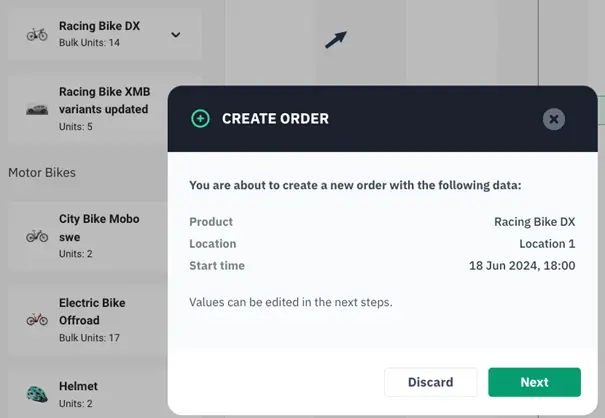
Schedule: Click-to-create order on product lines
In the Schedule, you can now click to the right of an inventory item and to the right of a product to create an order for that product. We recommend most teams try this out — it’s an easy way to check a product’s availability and book it directly from the Schedule itself, without switching screens.
Customer discounts split into sales and rental products
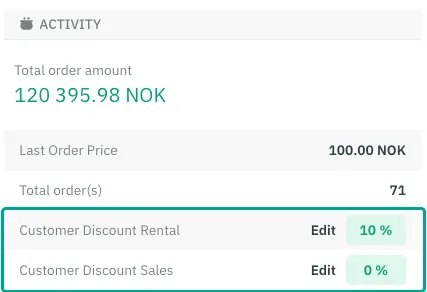
Sometimes you want to discount rental products only, or sales products only — not both. We’ve split the customer discount field so you can set each independently, which gives you finer control over margins. Head to Customers → select a customer, and look under Activity for the updated fields. If a customer already had a general discount set, that value now populates both fields, though you’re free to edit either one. These discounts also appear on email receipts. This pairs well with the pricing configuration options already in the platform.
Location filter for products in “Create Order”
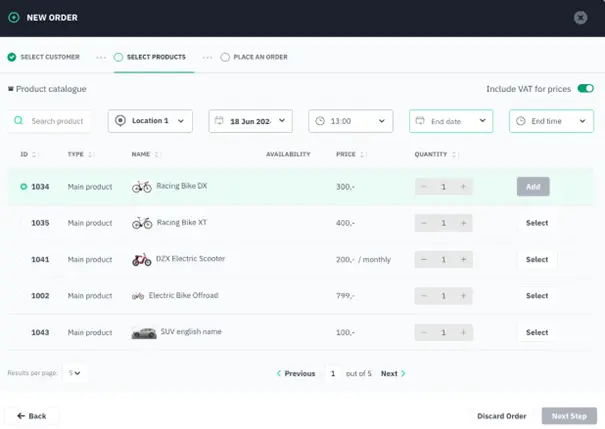
Not every location carries every product. The Create Order pop-up now filters the product list to only what’s available at the location the user has access to. To control which locations a product appears in, go to Products → select a product → More Options → Channels & Locations → select locations. Note: a product needs inventory set up at a location to be visible in the shop for end users — a detail worth checking in your inventory management setup if a product isn’t showing where you expect.
Safari: Broken “Create new product” pop-up now fixed
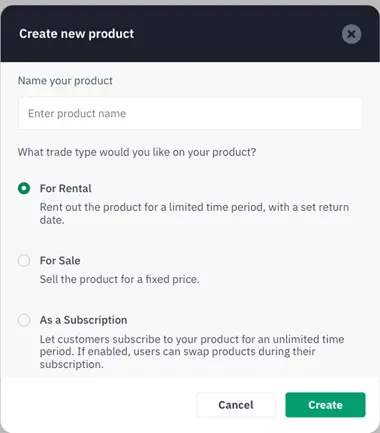
We identified and resolved a bug where the “Create Product” pop-up didn’t render correctly in Safari. It’s fixed as of this release — no action needed on your end.
Tip: Flatten out your peak hours
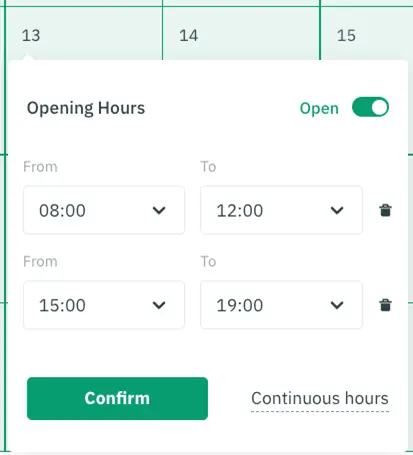
If you’re seeing long queues at certain pickup or return times, go to Settings → Channels and adjust the opening hours for that specific date. Existing bookings during peak hours will still be honored, but new bookings will be pushed outside the busy window — a simple way to smooth out foot traffic without turning customers away. For more operational tips like this, browse our Academy resources.
Where This Fits in Your Broader Setup
These features slot into the wider Sharefox toolkit — whether you’re running vehicle rentals, managing a self-storage site, or selling through the online rental store. If you rely on third-party tools for accounting, payments, or ID verification, check our integrations page to see what connects out of the box, and if you want a closer look at any of it, you can always book a demo.
Previous Updates
Did you miss our previous product updates? Read up on them here.
 All in one platform


